Compliance Management · Audit Management
Be ready to show what was assessed, by whom, and on what evidence.
Control assessments with owners and reviewers, evidence recorded against each control, and an append-only log of every change.
The problem
Audit preparation starts from scratch each time
When an auditor asks how a control is met, the answer is usually assembled on the day from emails, shared folders and memory.
- Assessments are recorded without the evidence that supports them.
- Nobody can show who changed a record, or when.
- Review dates pass without anyone being told.
- The same questions are answered again for every audit.
What it does
Audit Management in ControlMap
Every control in ControlMap is assessed in the same way: whether it applies, how far it is implemented, the quality of the evidence, who owns it, who reviewed it and when it is next due. Implementation and evidence are scored separately, so a control that is claimed but not evidenced is visible as exactly that.
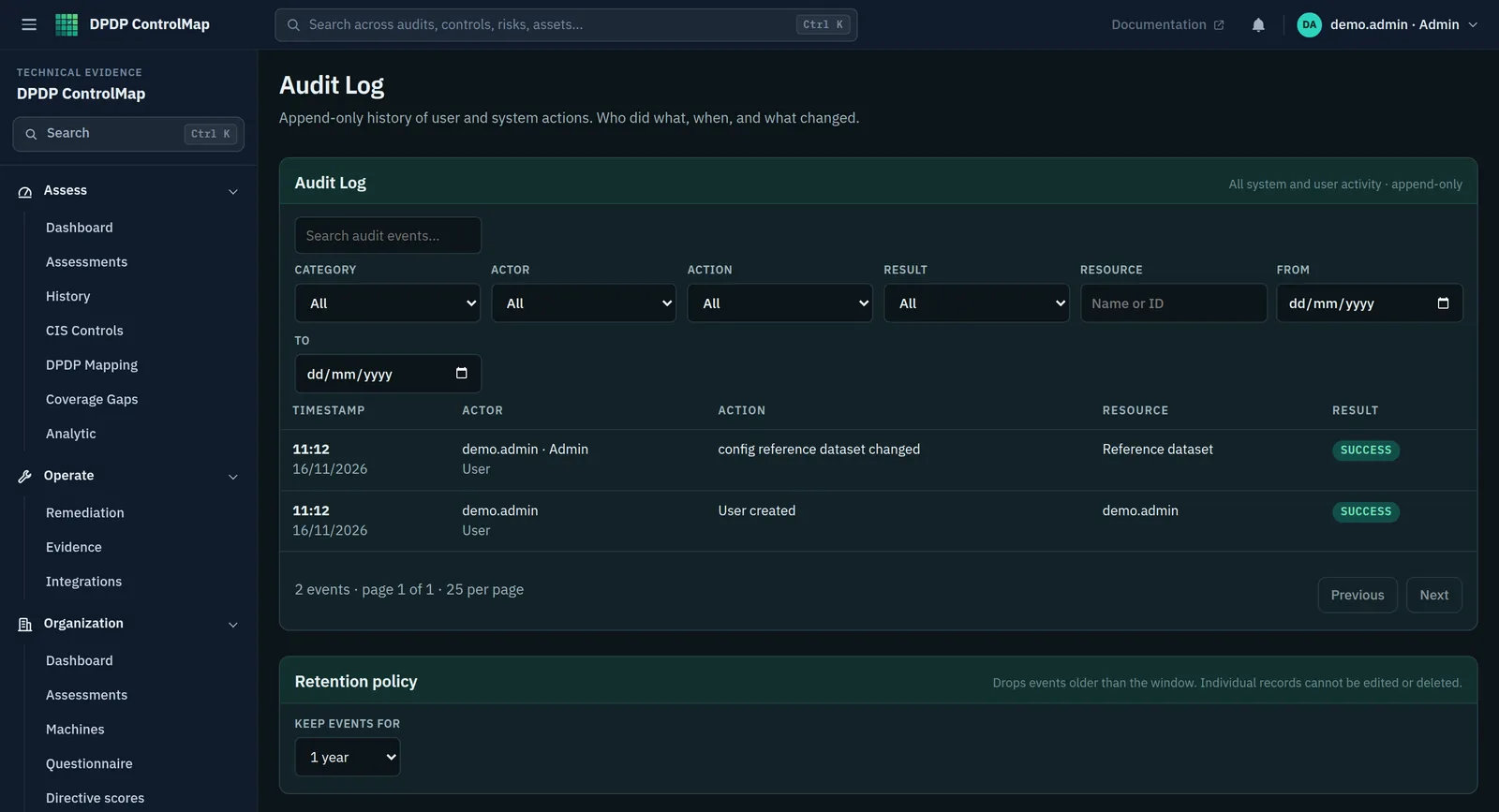
Behind the assessments is the audit log, an append-only history of user and system actions. It records who did what, when, and what changed, across authentication, users, assessments, evidence, configuration and the registers. For Significant Data Fiduciaries, the SDF module also holds the independent auditor's details and the schedule for the periodic audit.
Key capabilities
What you can do with it
Consistent control assessments
Applicability, implementation status, evidence quality, owner, reviewer, last reviewed and next due for every control.
Evidence against each control
A note of the evidence, references to the files that hold it, and a quality rating.
Findings and remediation
A finding recorded on a control becomes a remediation item with an owner, a due date and a status.
Append-only audit log
A filterable history by category, actor, action, result, resource and date. On the server, entries are chained so that alteration is detectable.
Retention setting
Choose how long audit events are kept, and have the change itself logged.
Audit schedule for SDFs
Record the independent data auditor, the last audit, the next due date and the cadence.
In the product
The audit log
Every change in the workspace, in order, with the person who made it.
- Filters for category, actor, action, result, resource and date
- Time, actor, action, resource and result for each event
- A retention policy setting for audit events
Typical workflow
How teams use it
A common sequence. The product does not force the order, and you can return to the earlier steps as you learn more.
Set the scope
Decide which modules and controls apply, and mark the rest not applicable with a reason.
Assign owners and reviewers
Each control has someone who answers for it and someone who checks.
Assess and record evidence
Record status and evidence for each control. Leave unevidenced claims visible.
Remediate findings
Track each finding to closure with an owner and a date.
Hand over the record
Give the auditor the assessments, the evidence references and the log of changes.
DPDP governance
How it supports your obligations
Only Significant Data Fiduciaries have a statutory audit requirement. For everyone else, an audit-ready record is good practice and the basis for answering the Board if asked.
A Significant Data Fiduciary is to appoint an independent data auditor to evaluate its compliance, and to undertake periodic audit.
The auditor and audit schedule are recorded, and overdue or missing schedules are raised as findings.
A Significant Data Fiduciary is to undertake a Data Protection Impact Assessment and an audit once in every period of twelve months, and cause a report of significant observations to be furnished to the Board.
The cadence and next due date are tracked with an owner.
A Data Fiduciary is to implement appropriate technical and organisational measures to ensure effective observance of the Act and Rules.
Assessments, evidence and the change log are a record of those measures in operation.
Scope
What stays with you
We would rather you knew the boundaries before a demo than discovered them after.
- ControlMap is not an audit engagement tool. It does not hold audit plans, sampling or workpapers.
- Evidence is recorded as notes and file references. ControlMap is not a document repository.
- It does not appoint or stand in for an independent data auditor.
Questions
Audit Management: common questions
Can an external auditor use ControlMap directly?
Yes, with a viewer account. The product has three roles: admin, analyst and viewer. A viewer has read-only access and cannot change assessments, registers or settings.
Can the audit log be edited?
No. It is append-only. In the server deployment each entry is chained to the previous one by a hash, so a missing or altered entry breaks the chain.
Does every organisation need a DPDP audit?
The Act requires periodic audit by an independent data auditor for Significant Data Fiduciaries. Other organisations may choose to audit themselves; that is a decision for your governance team and advisers.
See Audit Management in a demo.
We will show the module with the product's sample data and answer what it does and does not cover.