The platform

Privacy governance as a working system, not a set of documents.

DPDP ControlMap holds your personal data inventory, your obligations under the Act and the Rules, the evidence that you meet them and the work still to do. One record, kept current by the people who own each part.
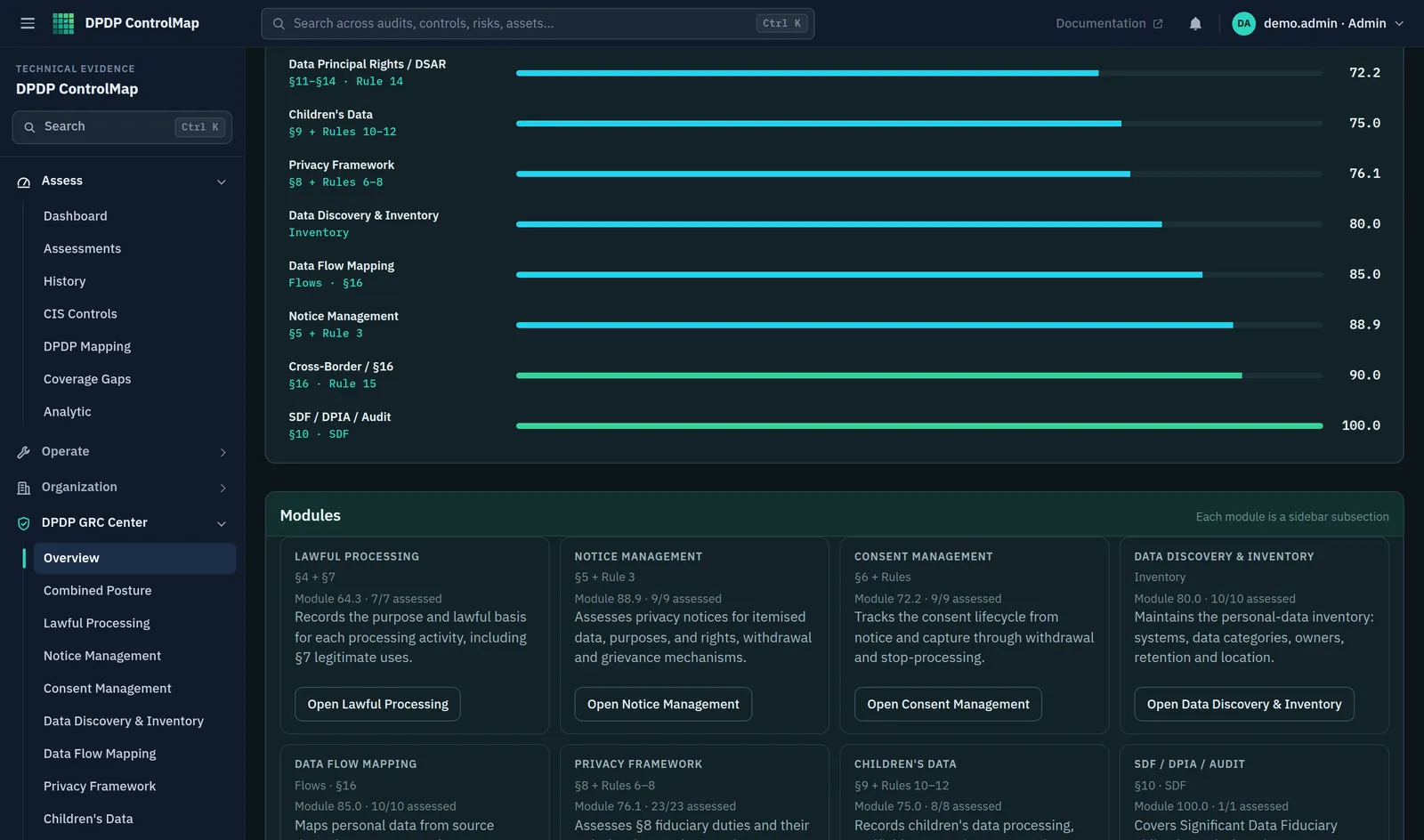
Module readiness bars followed by a card for each module, showing the Act sections it covers, how many controls are assessed and a button to open it.

How it is designed

Three decisions that shape the product

They are the reason ControlMap behaves differently from a checklist or a spreadsheet.

  • The law comes first

    Controls are written from the Act and the Rules and carry their reference. Where a control is good practice and not a statutory duty, it is labelled as such.

  • Evidence is not the same as a claim

    Each control has one score for how far it is implemented and another for the quality of the evidence. The two are reported side by side and never averaged into one.

  • Readiness, not certification

    ControlMap shows how prepared your organisation is and where the gaps are. It does not declare you compliant, and no software can.

Centralised compliance management

Every obligation in one place, with someone answerable for it

The DPDP GRC Center organises 100 controls into 10 modules, from lawful processing to cross-border transfers.
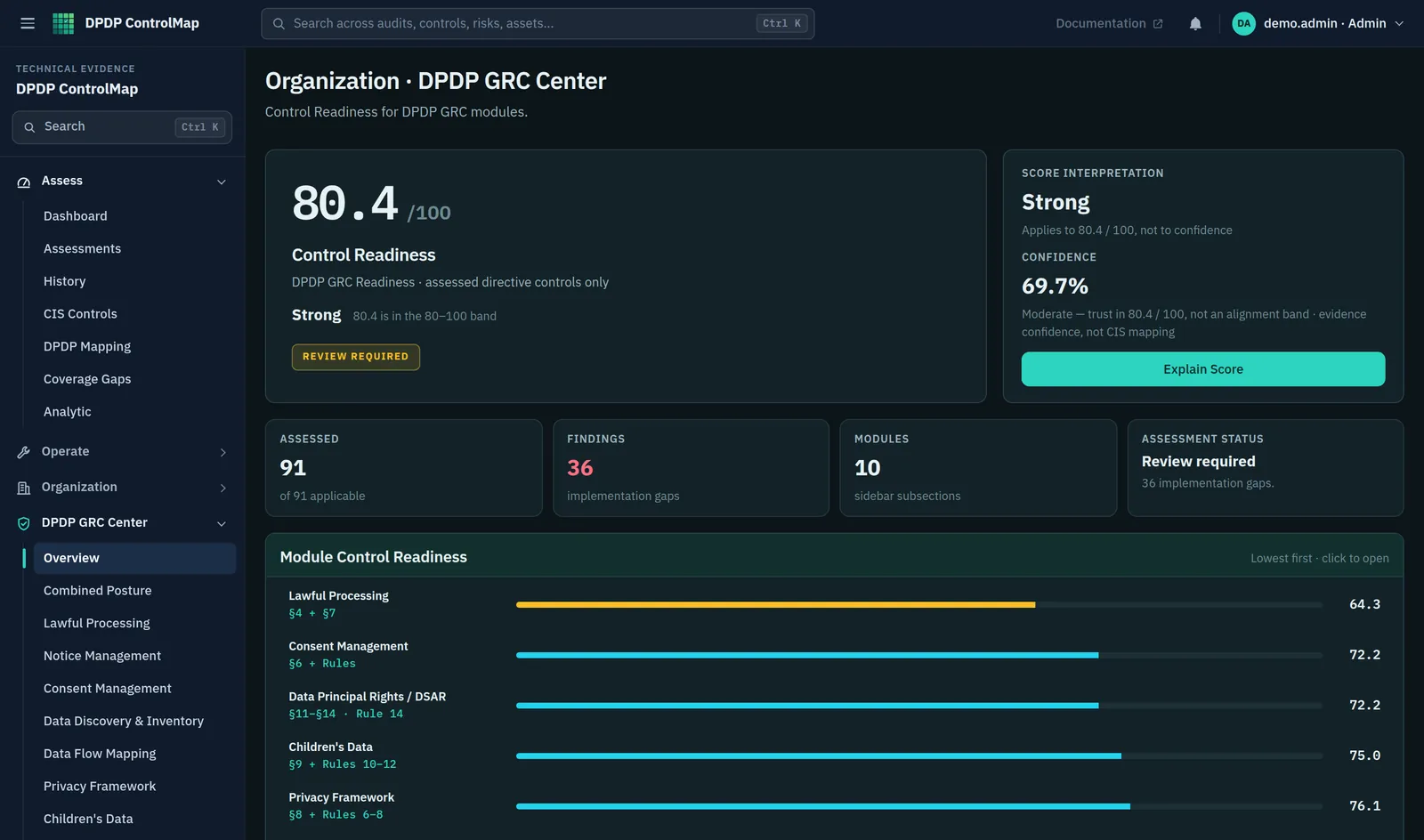
  • Each control is assessed for applicability first, so that what does not apply is set aside with a reason
  • Implementation status, evidence quality, owner, reviewer and next review date are recorded for every control
  • Module readiness is shown with its confidence, so a high score on thin evidence is visible
  • Significant Data Fiduciary controls count only once the organisation has been designated
Compliance Management modules
The DPDP GRC Center in ControlMap: an overall Control Readiness score with its confidence, counts of assessed controls and findings, and a readiness bar for each module from Lawful Processing to Data Discovery and Inventory.
Product screenshot. The organisation and records shown are sample data that ships with ControlMap.

Personal data governance

Know what you hold, where it sits and where it goes

The inventory and the flow map are the foundation. Notices, rights requests and transfer assessments all draw on them.
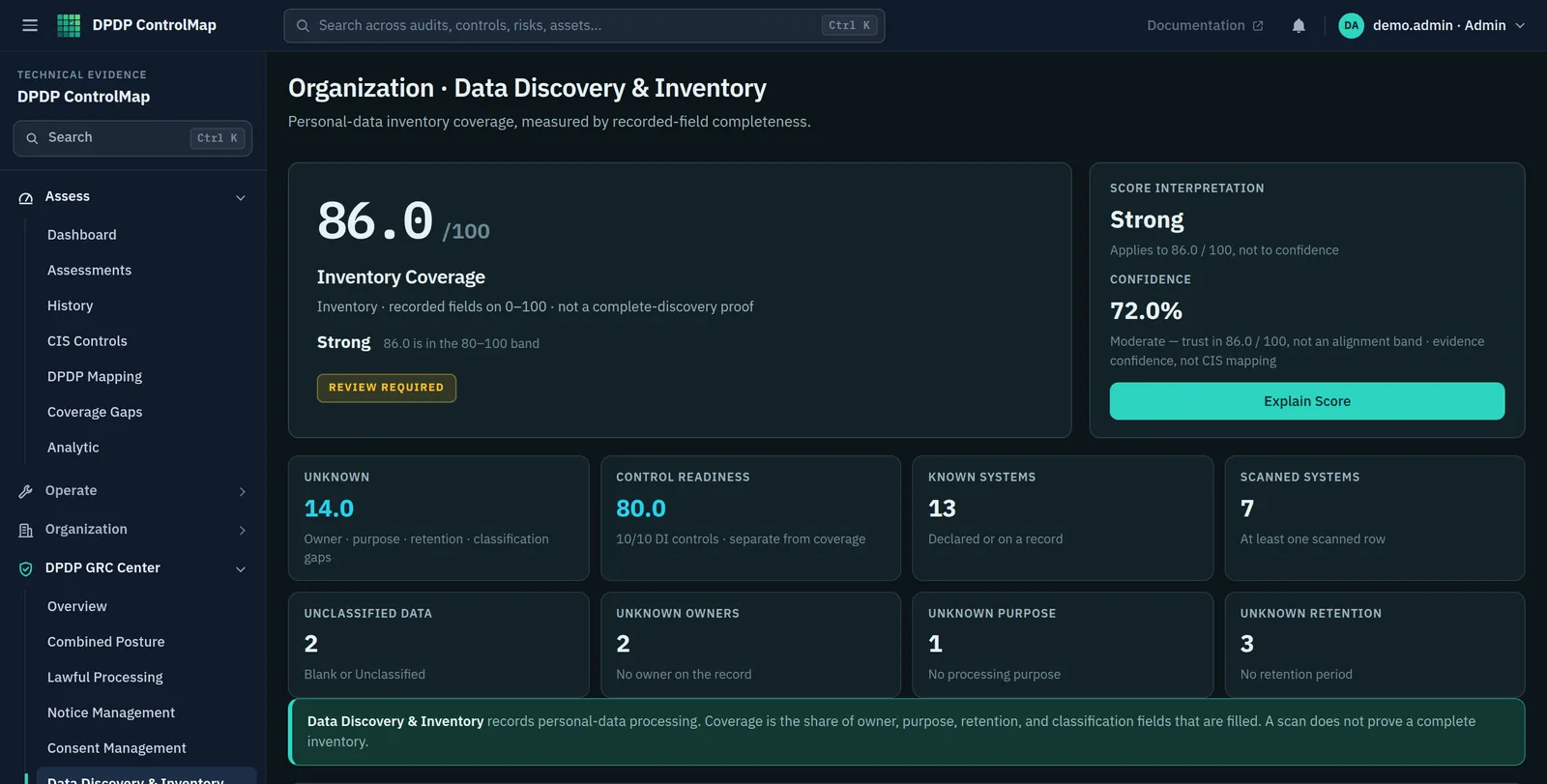
  • A register of datasets with owner, purpose, processing basis, location, processor and retention
  • Coverage reported honestly: how much of the inventory is complete, and how much is still unknown
  • Data flows drawn across lanes from source to destination, with processors and third parties counted
  • Cross-border hops identified and passed to a transfer assessment
Data Governance modules
Data Discovery and Inventory summary: an inventory coverage score, the number of known and scanned systems, and counts of records with unclassified data or with no owner, purpose or retention period.
Product screenshot. The organisation and records shown are sample data that ships with ControlMap.

Privacy operations

The parts of the Act that Data Principals see

Notices, consent, rights requests and grievances are handled as processes with stages, owners and records.
  • Privacy notices kept as versions, each checked against Section 5 and Rule 3
  • Consent followed from notice to withdrawal, with an append-only ledger and signed receipts
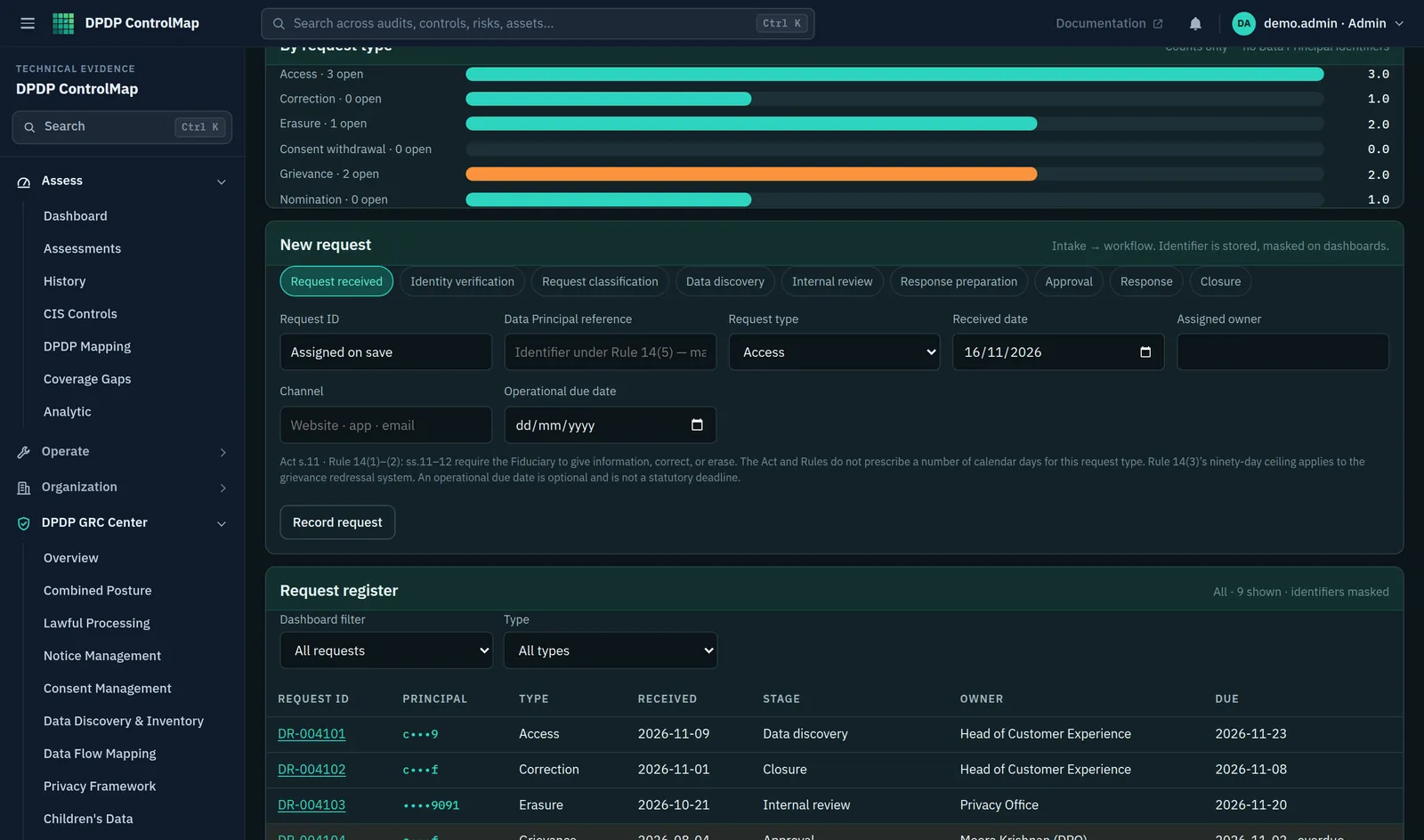
  • Rights requests moved through nine stages from receipt to closure, with masked identifiers
  • Grievances tracked against the period in Rule 14(3)
Privacy Operations modules
Data Principal Rights: open requests by type, a new request form with workflow stages from request received to closure, and a register of requests with masked identifiers, stage, owner and due date.
Product screenshot. The organisation and records shown are sample data that ships with ControlMap.

Regulatory control mapping

From a sentence in the Rules to something you can assess

A provision such as Rule 6 lists safeguards in a single paragraph. ControlMap separates it into controls, each with a question to answer and the evidence that would support the answer.

Reasonable security safeguards

From the ControlMap control catalogue · 7 of 100 controls

§8(5) · Rule 6PF-08.02
Security SafeguardsDoes the organisation take reasonable security safeguards to prevent a personal data breach, including the Rule 6 minimum measures?
Security policyCIS / Wazuh family scoresAccess-control standard
Rule 6(1)(a)PF-08.02.a
Encryption, obfuscation, masking or virtual tokens
Encryption standardCIS encryption family
Rule 6(1)(b)PF-08.02.b
Access control on computer resources
Access-control standardCIS access family
Rule 6(1)(c)PF-08.02.c
Logs, monitoring and review
Log standardCIS logging familySIEM note
Rule 6(1)(d)PF-08.02.d
Continuity and backups
Backup procedureCIS continuity family
Rule 6(1)(e)PF-08.02.e
One-year log and data retention for investigation
Log retention settingRetention schedule
Rule 6(1)(f)PF-08.02.f
Processor security in contract
Processor contract clause

Each control is assessed separately for implementation and for evidence. An assessment records what your organisation has in place; it is not a legal determination.

§5 · Rule 3 · NT-05.03

Personal data itemisation

Does the notice itemise the personal data being processed?

§6 · CM-06.06

Withdrawal Mechanism

Can the Data Principal withdraw consent as easily as it was given?

§13(2) · Rule 14(3) · DR-13.02

Grievance tracking

Are grievances tracked to a response within a reasonable period not exceeding ninety days from receipt, with overdue items visible to management?

Rule 7(2) · PF-08.05.c

Detailed Board report within 72 hours

Can a detailed update reach the Board within 72 hours of becoming aware of the breach, or within a longer period the Board allows in writing?

§16 · Rule 15 · CB-16.03

Restriction notification watch

Are Central Government restriction notifications recorded here (country or territory and notification reference), and is an empty watch treated as ‘none recorded in this workspace’ rather than ‘none exist’?

§10(1) · SDF-10.01

SDF designation status

Is Central Government designation as a Significant Data Fiduciary recorded — including the notification or class reference — or is it recorded that the organisation is not designated?

A map, not a legal opinion. The catalogue is ControlMap's reading of the Act and the Rules, organised for assessment. It is a working tool. It does not replace the official text or advice from a qualified lawyer.

Audit and evidence

Show what was assessed, by whom, on what evidence

An assessment is only as good as the record behind it. ControlMap keeps that record as the work is done.
  • Evidence recorded against each control: a note, references to the files and a quality rating
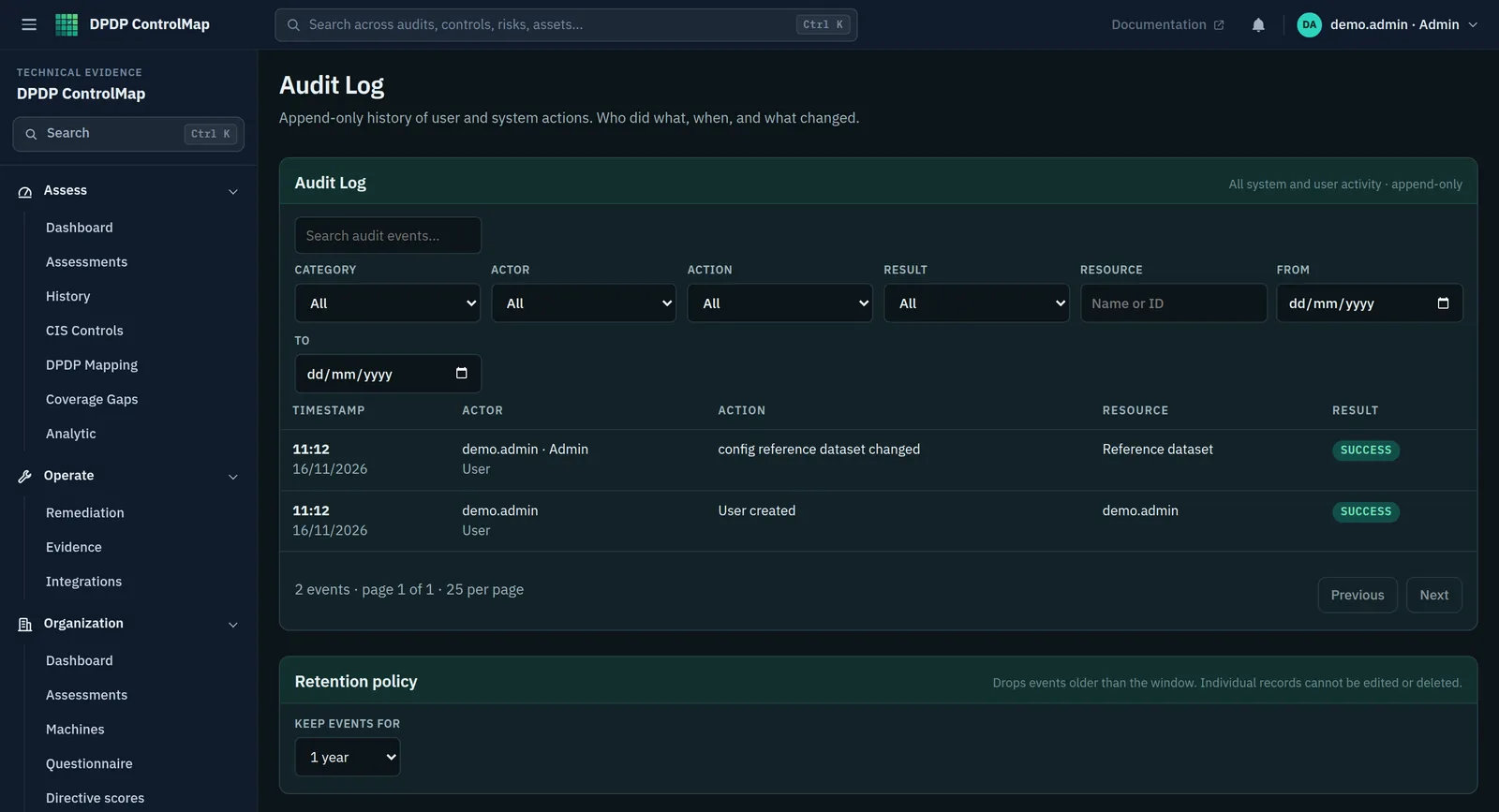
  • An append-only audit log of user and system actions, filterable by category, actor and date
  • On the server, log entries are chained by hash so that alteration is detectable
  • Three roles (admin, analyst and viewer) so that reviewers can read without changing
Audit Management
The audit log: filters for category, actor, action, result, resource and date above a table of events showing time, actor, action, resource and result, and a retention policy setting.
Product screenshot. The organisation and records shown are sample data that ships with ControlMap.

Risk and remediation

Findings that turn into work with an owner and a date

Gaps are raised from the records themselves and stay open until someone closes them.
  • Findings raised automatically, such as a flow with no known processor or a consent with no evidence
  • Remediation items with an owner, a due date and a status
  • Technical checks from CIS benchmark assessments and Wazuh, mapped to the safeguards in Rule 6
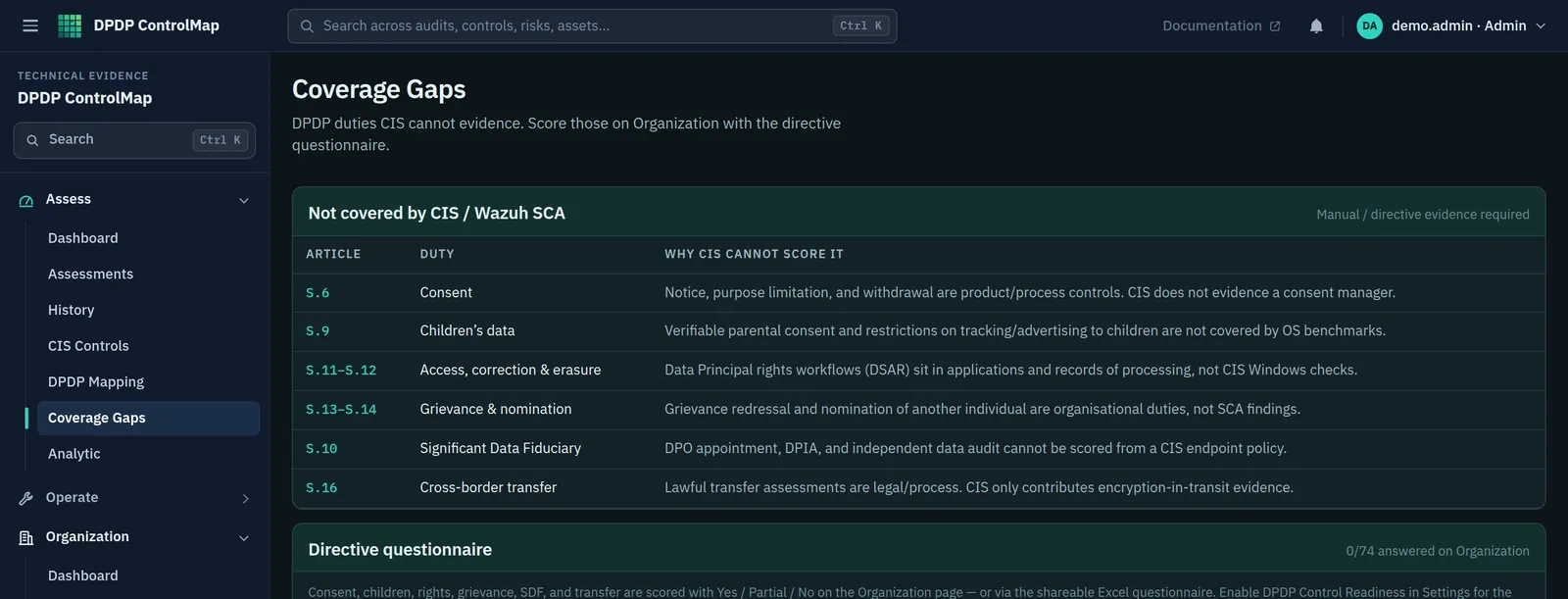
  • A list of the duties that technical scans cannot evidence, so nothing is assumed to be covered
Security and Risk modules
The coverage gaps page listing DPDP duties that technical scans cannot evidence, such as consent, children's data, rights requests and cross-border transfer, each with the reason it needs a manual assessment.
Product screenshot. The organisation and records shown are sample data that ships with ControlMap.

Reporting and monitoring

An answer to "where do we stand?"

Readiness is shown by module and over time, with technical and governance results kept distinct.
  • Control readiness for each module, with implementation, evidence and confidence as separate figures
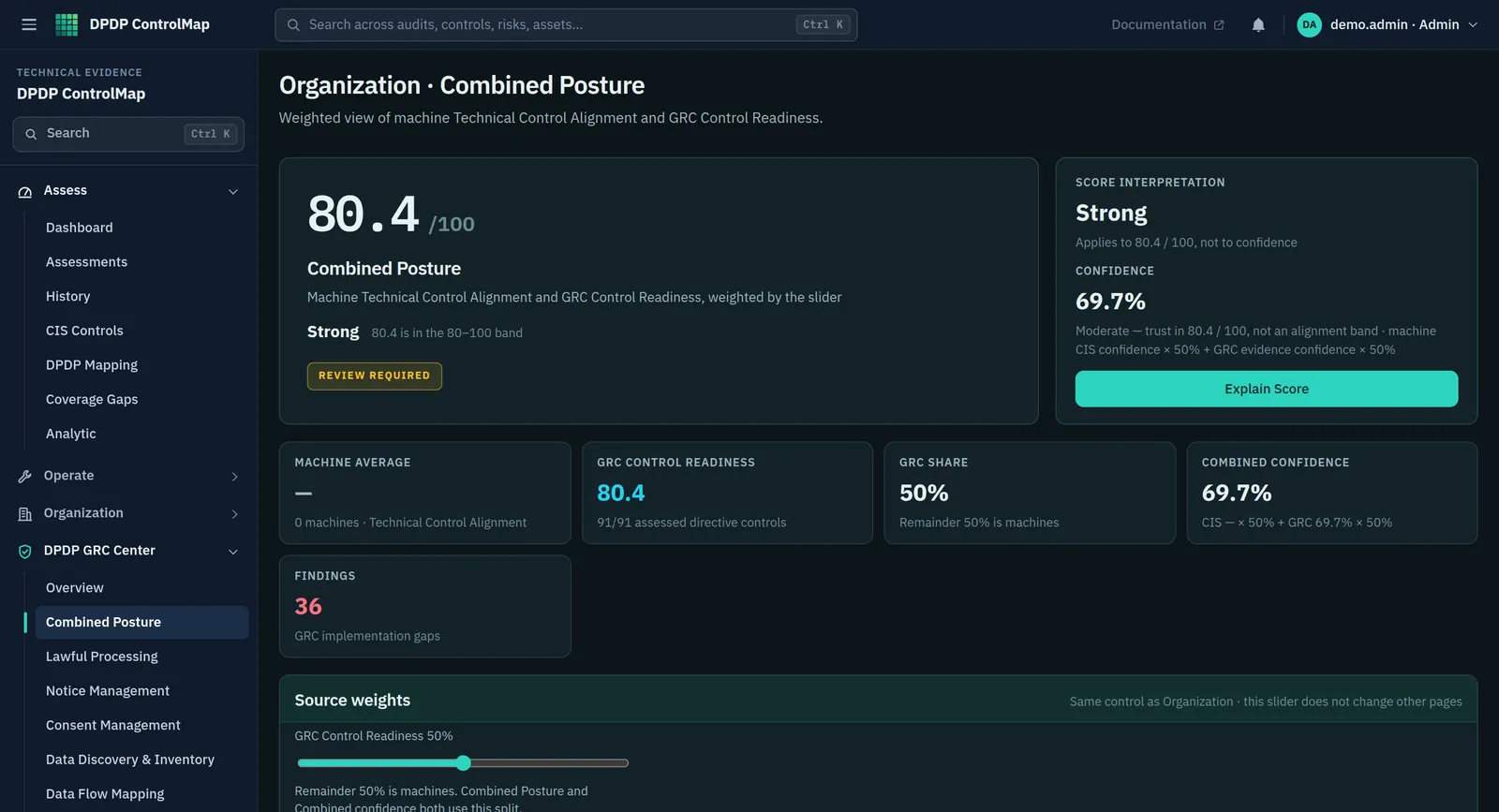
  • A combined view that sets technical control alignment beside governance readiness
  • History of stored assessments, so that movement between periods can be shown
  • PDF reports of technical readiness for executives, engineers and auditors
  • In-app alerts when findings, evidence or remediation need attention
Reporting and Intelligence
The Combined Posture view, which shows technical control alignment from machine scans beside control readiness from the governance modules, with the weighting between them.
Product screenshot. The organisation and records shown are sample data that ships with ControlMap.

How the parts fit

One catalogue between your records and your reports

Facts come in from your teams and systems. They are held as records, assessed against the control catalogue, and reported.

How information moves through ControlMapIllustrative
Your organisationWhere the facts come from
  • Privacy and legal
  • Security and IT
  • Business owners
  • Websites and apps
  • Endpoint scans
RecordsWhat ControlMap holds
  • Data inventory
  • Data flows
  • Notices
  • Consent ledger
  • Rights requests
  • Registers
Control catalogueHow records are assessed
  • Act and Rules references
  • 100 controls
  • Implementation
  • Evidence
  • Findings
OutputsWhat you take away
  • Readiness by module
  • Remediation
  • Reports
  • Audit log
  • Alerts

This diagram shows the logical arrangement of the product. It is not a network or deployment diagram.

Connections

Works with what you already run

ControlMap takes in technical evidence and consent events, and gives other systems a way to check and honour consent.

  • Wazuh

    Connect a Wazuh manager to bring in configuration assessment results from your endpoints.

  • CIS benchmark results

    Import CIS configuration assessment exports as CSV or JSON, with or without a live connection.

  • Single sign-on

    Sign in through an identity provider using OpenID Connect, alongside local accounts. Keycloak is the tested provider.

  • Website consent banner

    One script tag on your site records choices per purpose and holds back third-party scripts until consent.

  • Consent API and webhooks

    Systems check consent before processing and receive a signed notification when it is withdrawn.

  • Spreadsheets

    Import consent records from an Excel template, and export the consent and notice registers as CSV.

See the platform with your own questions.

A demo walks through the modules that matter to you, using the sample data that ships with the product.