Privacy Operations · Consent Management
Follow every consent from notice to withdrawal, and show that processing stopped.
A consent register, a website banner, a tamper-evident ledger with signed receipts, and a record of whether each connected system acted when consent ended.
The problem
Capturing consent is the easy half
Most systems can record that a box was ticked. Far fewer can show which notice the person saw, prove the record has not been altered, or demonstrate that processing ended when consent was withdrawn.
- Consent records sit in each application, in different formats.
- The notice version shown at the time of consent is not recorded.
- Withdrawal is captured in one system and ignored by the others.
- When consent is questioned, proof has to be pieced together from logs.
What it does
Consent Management in ControlMap
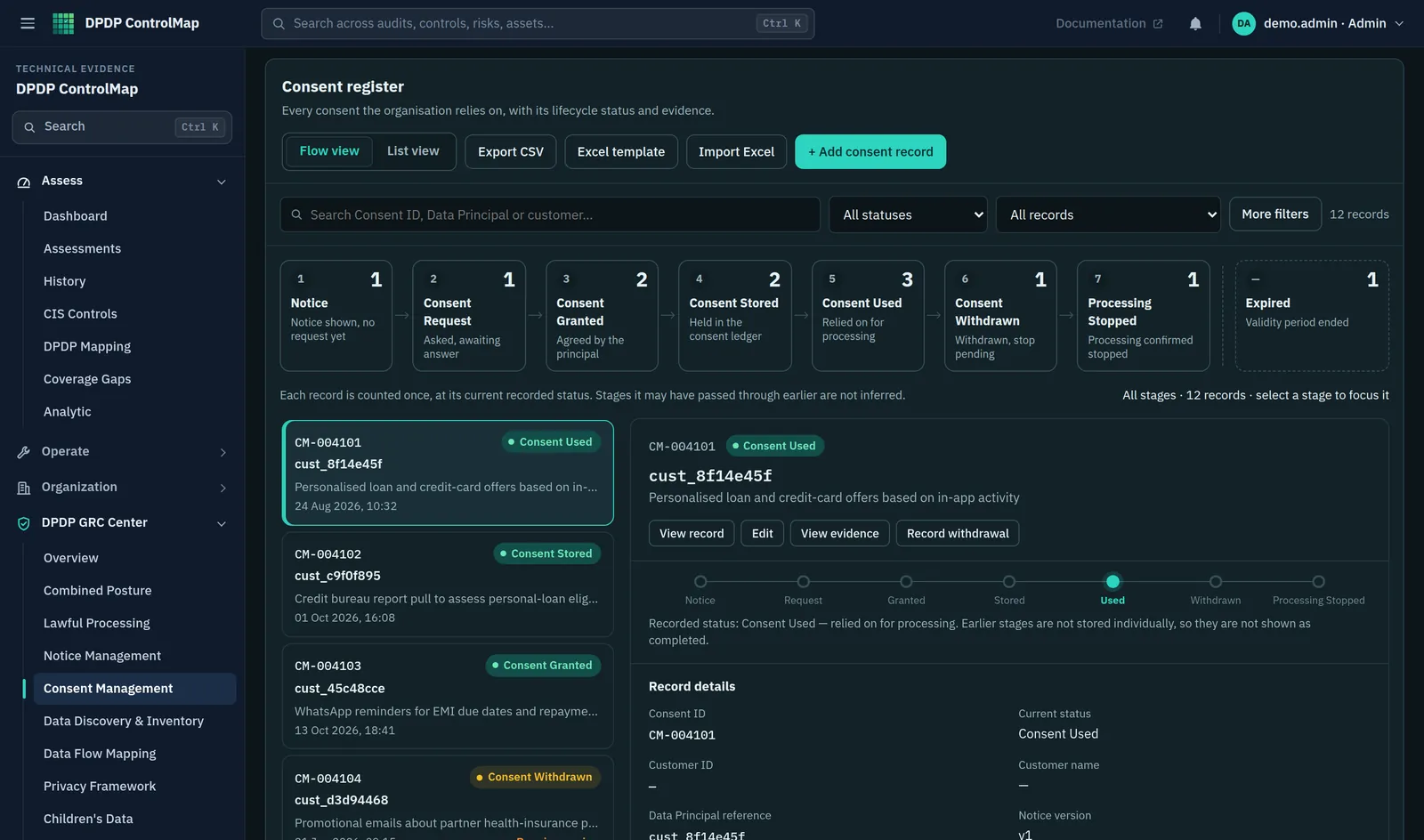
The consent register follows each record through eight stages: notice, consent request, granted, stored, used, withdrawn, processing stopped and expired. It raises findings where a consent lacks a purpose, refers to an obsolete notice, has a withdrawal that was not processed, or has no evidence.
When ControlMap runs with its server, consent events from your website or applications are written to an append-only ledger in which each entry is chained to the one before it. Every event produces a signed receipt that can be verified against published public keys. Systems that process personal data can check consent before acting, are told when it ends, and are asked to confirm that they stopped.
Key capabilities
What you can do with it
Lifecycle register
Eight stages from notice to expiry, with a count at each stage and the records behind it.
Purpose catalogue
Consent is recorded per purpose, each tied to a notice version, so specific consent is specific in the record too.
Website consent banner
A banner your site loads with one script tag. Visitors choose per purpose, in the languages you configure, and can reopen their preferences at any time.
Blocking until consent
Third-party scripts and embedded frames marked with a purpose are not loaded until the visitor grants it.
Append-only ledger
Grants, withdrawals, expiries and stops are stored as chained entries that the database refuses to update or delete. Client address and browser details are stored only as salted hashes.
Signed receipts
Each event yields a receipt signed with your organisation's key (EdDSA), verifiable with any standard JOSE library.
Downstream enforcement
Connected systems query consent before processing, receive a signed notification on withdrawal or expiry, and acknowledge that they stopped. A missed acknowledgement becomes a finding.
Import and export
Bring existing consent records in from an Excel template and export the register as CSV.
In the product
The consent lifecycle
The register in flow view shows where every consent record stands.
- Eight lifecycle stages, each with a count
- A selected record with its stage, purpose and notice version
- Findings for records that lack a purpose, evidence or a processed withdrawal
Typical workflow
How teams use it
A common sequence. The product does not force the order, and you can return to the earlier steps as you learn more.
Define purposes
List each purpose for which you ask consent and link it to the notice version that describes it.
Capture consent
Through the banner on your website, through your own application using the API, or by importing existing records.
Use it
Systems that process the data check that consent is current before they act.
Handle withdrawal
A withdrawal is written to the ledger, and each connected system is notified and asked to acknowledge.
Confirm processing stopped
When every system has acknowledged, the stop is recorded. Any that has not is listed as a finding.
DPDP governance
How it supports your obligations
Consent is the most detailed part of the Act. These are the requirements the module is built around.
Consent is to be free, specific, informed, unconditional and unambiguous with a clear affirmative action, and limited to the personal data necessary for the specified purpose.
Consent is recorded per purpose against a notice version, and the banner requires an affirmative choice.
A Data Principal may withdraw consent at any time, with the ease of doing so comparable to the ease with which it was given.
The banner keeps a preferences control on the page, and withdrawals are recorded as ledger events.
On withdrawal, the Data Fiduciary is to cease, and cause its Data Processors to cease, processing within a reasonable time, unless processing without consent is required or authorised by law.
Connected systems are notified and their acknowledgements tracked until processing is recorded as stopped.
Where consent is the basis of processing and a question arises in a proceeding, the Data Fiduciary is to prove that a notice was given and consent was given in accordance with the Act and Rules.
The ledger and signed receipts are a record of who consented to what, when, and under which notice.
Scope
What stays with you
We would rather you knew the boundaries before a demo than discovered them after.
- The ledger, receipts, banner and downstream notifications need the ControlMap server. The register alone works without it.
- A downstream acknowledgement is that system's statement that it stopped. ControlMap does not verify what happens inside it.
- The interface for registered Consent Managers follows a provisional profile, because no official interoperability specification has been published. It will need adapting when one is.
- ControlMap does not verify age or parental identity. Children's data is handled through the Children's Data module and your own verification process.
Questions
Consent Management: common questions
Is the consent banner a cookie banner?
It works for cookies and for any other purpose. You define purposes; the banner records a choice for each and blocks scripts and frames marked with a purpose until it is granted.
What makes the ledger tamper-evident?
Each entry includes a hash of the previous entry, so altering or removing one breaks the chain, and the database table rejects updates and deletions. Receipts are signed separately and can be checked without access to ControlMap's database.
Does this make ControlMap a Consent Manager under the Act?
No. A Consent Manager is a person registered with the Data Protection Board under Section 6 and Rule 4. ControlMap is software a Data Fiduciary uses to manage its own consent records.
What if we do not rely on consent?
Then this module may apply to only part of your processing. Activities under Section 7 are recorded in Lawful Processing. Many organisations use both.
See Consent Management in a demo.
We will show the module with the product's sample data and answer what it does and does not cover.