Data Governance · Data Inventory
One register of the personal data your organisation holds.
Every dataset with its owner, purpose, basis for processing, location, processor and retention period, kept where the rest of your DPDP work is done.
The problem
The inventory lives in a spreadsheet nobody trusts
A data inventory is usually compiled once, for an audit or a project, and then left. Six months later it disagrees with reality and with every other document that depends on it.
- Different teams keep different lists with different columns.
- Owners and retention periods are blank for half the rows.
- Notices, flow maps and rights requests are prepared without reference to it.
- There is no record of when an entry was last reviewed.
What it does
Data Inventory in ControlMap
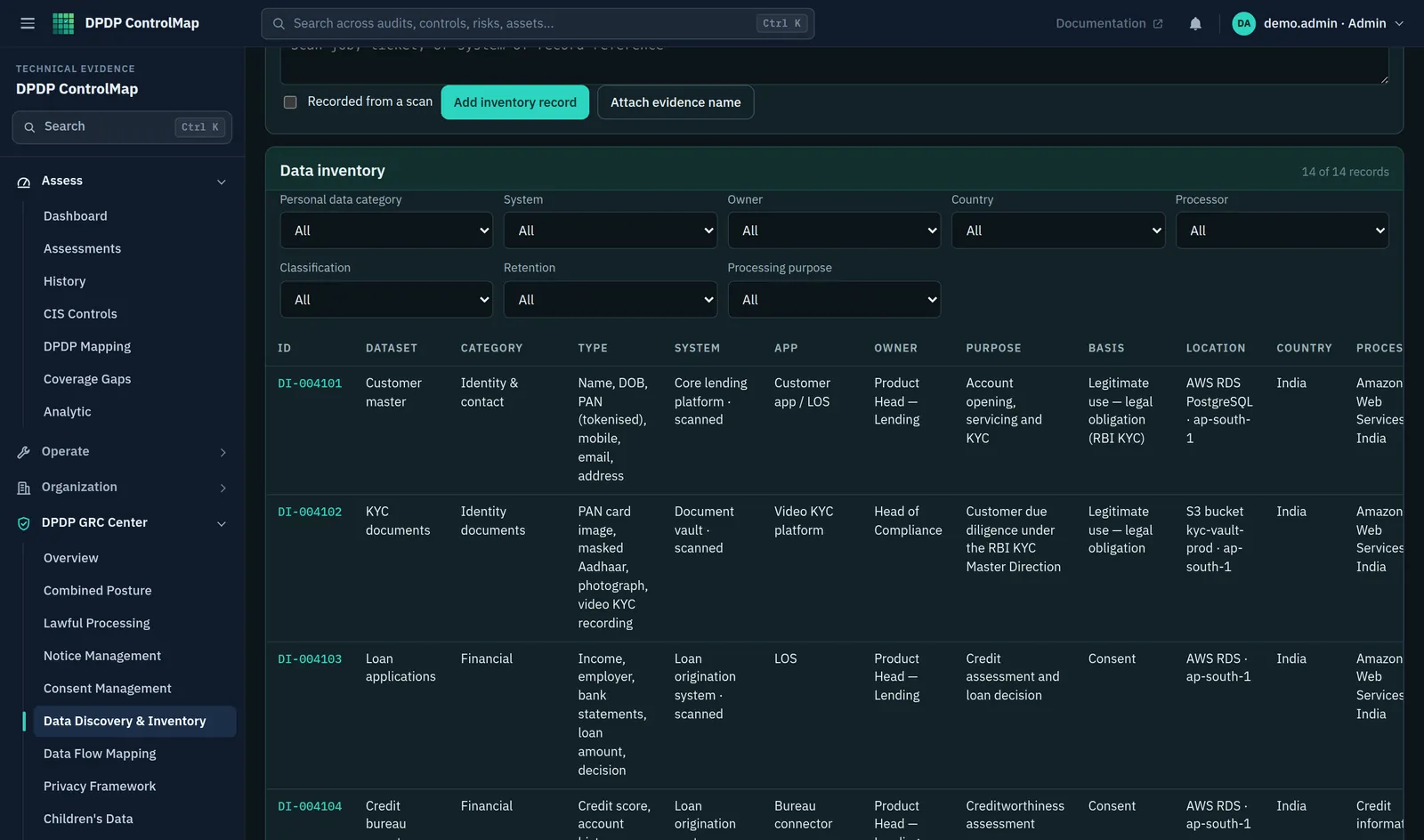
The inventory is a structured register. Each record describes one dataset: what category of data it is, which personal data types it contains, the system and application that hold it, who owns it, why it is processed and on what basis, where it is stored and in which country, which processor handles it, and how long it is kept.
Records move through draft, active, under review and retired. The register can be filtered by any of these fields, and the module's controls assess whether the inventory as a whole is being maintained.
Key capabilities
What you can do with it
A consistent record
The same fields for every dataset: category, personal data type, system, application, owner, purpose, processing basis, storage location, country, processor and retention.
Security attributes
Record the classification, encryption status and access group for each dataset alongside its privacy attributes.
Lifecycle status
Draft, active, under review and retired, so the register reflects what is in use today.
Evidence and review date
Attach a note of the evidence behind each record and set the date it should next be reviewed.
Filters for gaps
Find every record with no owner, no purpose, no retention period or no classification in one step.
Ten inventory controls
Controls covering categories, owners, purposes, systems, locations, retention, third-party access, classification and discovery coverage.
In the product
The inventory register
A filterable table of datasets, with the attributes a privacy review asks about in the columns.
- Category, personal data types, system and application for each dataset
- Owner, purpose and processing basis in the same row
- Storage location and country, which the flow and cross-border modules also use
Typical workflow
How teams use it
A common sequence. The product does not force the order, and you can return to the earlier steps as you learn more.
Create a record for each dataset
Name the dataset and the system that holds it. Leave it in draft until the detail is confirmed.
Assign an owner
A named person or role who answers for the dataset and reviews the record.
Record purpose, basis and retention
State why the data is processed, whether on consent or a legitimate use, and how long it is kept.
Record location and processor
Where it is stored, in which country, and which processor is involved.
Activate and review
Mark the record active and set a review date. Retire it when the dataset is decommissioned.
DPDP governance
How it supports your obligations
The Act does not prescribe an inventory. It is the working record that makes the prescribed duties practical to perform and to evidence.
Personal data may be processed only for a lawful purpose, with consent or for certain legitimate uses.
Each record states the purpose and the basis, so the question has an answer for every dataset.
Where personal data is likely to be used to make a decision affecting the Data Principal or disclosed to another fiduciary, its completeness, accuracy and consistency are to be ensured.
An owner is named for each dataset and is the person responsible for its quality.
Personal data is to be erased once the specified purpose is no longer served, subject to retention required by law.
A retention period is recorded for each dataset and its absence is counted as a gap.
The Central Government may restrict the transfer of personal data to notified countries or territories.
The country of storage is a field on every record.
Scope
What stays with you
We would rather you knew the boundaries before a demo than discovered them after.
- Records are entered and maintained by your teams. The product does not populate them from your systems.
- The retention period is a record of your policy. ControlMap does not delete data in other systems.
Questions
Data Inventory: common questions
What is one inventory record?
One dataset: a set of personal data held in one system for a purpose. An HR system might be several records, for example employee master data, payroll data and recruitment data, if they have different purposes or retention periods.
Can records be linked to data flows?
The flow map uses the same systems, processors and countries. Flows are recorded in the Data Flow Mapping module and reviewed alongside the inventory.
Does it record special categories of data?
The Act does not define special or sensitive categories. The inventory lets you record the data category and personal data types in your own terms, and classify records as personal, children's, confidential or restricted.
See Data Inventory in a demo.
We will show the module with the product's sample data and answer what it does and does not cover.