Data Governance · Data Discovery
Know which systems hold personal data, and how much is still unknown.
ControlMap gives discovery a structure: a list of the systems you know about, which of them have been checked, and a running measure of the gaps that remain.
The problem
You cannot govern data you have not found
Most organisations begin DPDP work with a partial picture. Personal data sits in production databases, but also in exports, shared drives, support tools and vendor platforms that nobody listed.
- Systems are added faster than any central list is updated.
- Discovery is run once, as a project, and is out of date within months.
- Nobody can say how complete the picture is, so every later answer is uncertain.
- Scan results from security tools are never joined to the privacy record.
What it does
Data Discovery in ControlMap
The Data Discovery and Inventory module records every system and dataset your teams identify, and marks each one as checked or not yet checked. It then reports coverage: how many records have an owner, a purpose, a retention period and a classification, and how many do not.
ControlMap does not connect to your databases or scan file stores. It holds the results of discovery, whether they come from interviews, questionnaires or the scanning tools you already run, so that the organisation has one place where the answer to "where is our personal data?" is kept current.
Key capabilities
What you can do with it
System and dataset records
List each dataset with the system and application that hold it, so discovery has a defined scope rather than an open-ended search.
Checked and unchecked
Mark a record once the system has been examined and attach the evidence, so reviewed systems are distinguishable from assumed ones.
Coverage score
A single figure for how much of the inventory has an owner, purpose, retention period and classification recorded.
Unknowns in view
Counts of records that are unclassified or have no owner, no purpose or no retention period, each one a filter on the register.
Discovery coverage control
A control in the catalogue asks whether discovery covers the systems in scope, and is assessed with evidence like any other.
Review dates
Each record carries a review date, so discovery becomes a cycle with named owners instead of a one-time exercise.
In the product
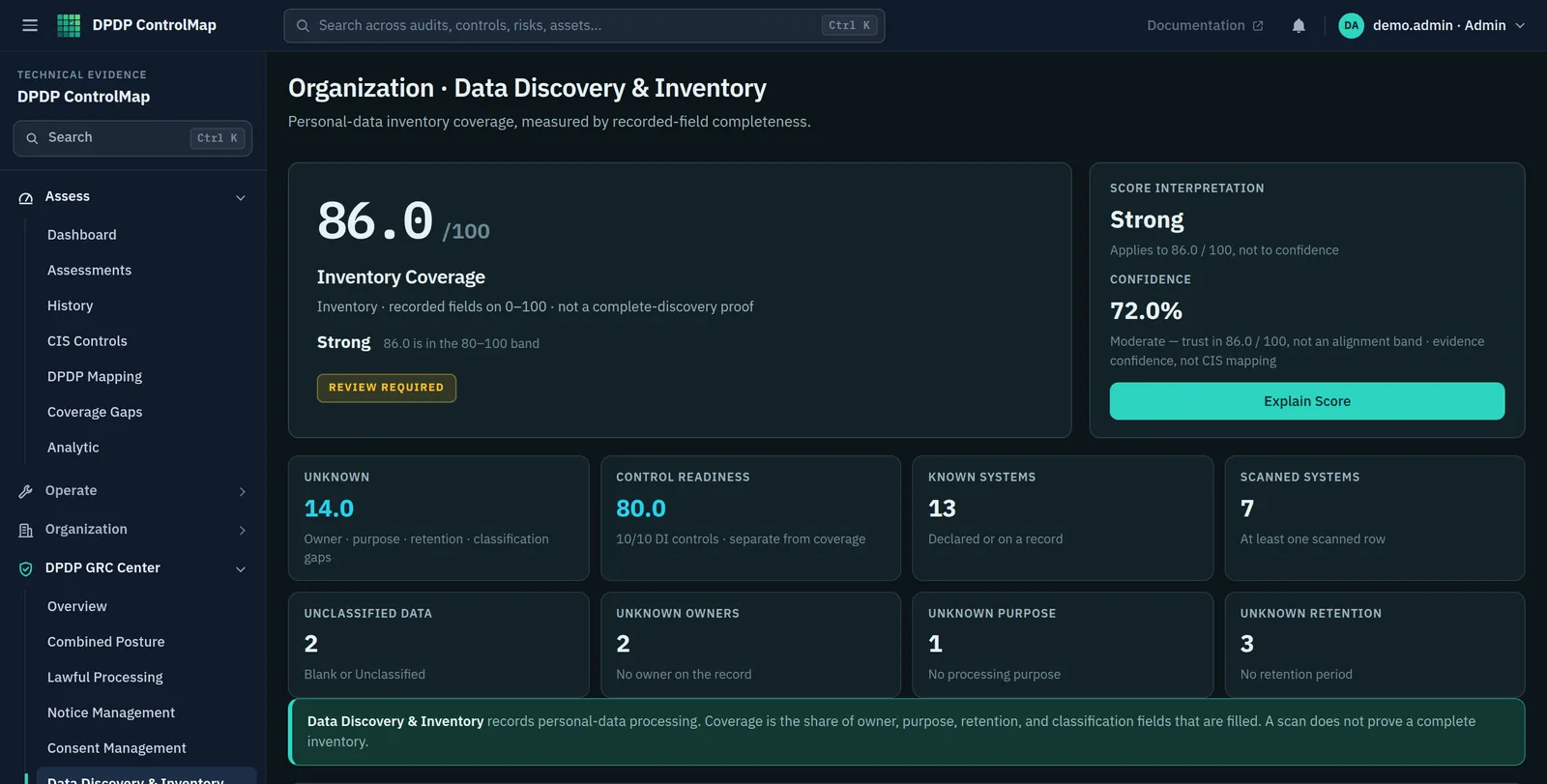
Coverage, and what is missing
The module summary shows how complete the inventory is and where the gaps are.
- Inventory coverage as a percentage, with the number of known and checked systems
- Counts of records with no owner, no purpose, no retention period or no classification
- A statement in the product that coverage is not proof that discovery is complete
Typical workflow
How teams use it
A common sequence. The product does not force the order, and you can return to the earlier steps as you learn more.
List what you know
Start with the systems everyone agrees hold personal data: HR, CRM, billing, support, the product database.
Ask each team
Walk through each function and add the exports, spreadsheets and vendor tools that the first pass missed.
Record what was checked
When a system has been examined, mark it and note the evidence: a scan report, a schema review, a signed-off questionnaire.
Work down the unknowns
Use the counts of missing owners, purposes and retention periods as the task list.
Review on a schedule
Set review dates so new systems and changes are picked up.
DPDP governance
How it supports your obligations
The Act does not use the word "discovery". It assumes a Data Fiduciary knows what personal data it processes, because every duty depends on it.
A notice must tell the Data Principal which personal data is to be processed and for what purpose.
You can only itemise data you have identified. The inventory is the source for that list.
Personal data is to be erased when consent is withdrawn or the specified purpose is no longer served, unless retention is required by law.
Erasure reaches only the copies you know about. Discovery records where they are.
Data Principals may ask for a summary of their personal data and for its correction or erasure.
A request can be answered fully only if the systems holding the data are known.
Scope
What stays with you
We would rather you knew the boundaries before a demo than discovered them after.
- ControlMap does not scan databases, file shares or cloud storage for personal data.
- Whether a system has been checked is recorded by a person. The product does not verify it.
- A high coverage score means the records you have are complete, not that every system has been found.
Questions
Data Discovery: common questions
Does ControlMap scan our systems for personal data?
No. It records the outcome of discovery and measures how complete your records are. If you use a scanning tool, record its findings and attach the report as evidence.
What does the coverage score measure?
The share of inventory records that have an owner, a purpose, a retention period and a classification. It measures the completeness of what you have recorded. It cannot measure systems you have not listed, and the product says so on the page.
How is this different from the Data Inventory module?
They are two views of the same register. Discovery is about scope and completeness: what is known, what has been checked, what is missing. The inventory is about the detail held for each dataset.
See Data Discovery in a demo.
We will show the module with the product's sample data and answer what it does and does not cover.