Data Governance · Data Flow Management
Review every data flow for owner, basis, processor and country.
A register of flows with the attributes that matter under the Act, and findings raised automatically where one is missing.
The problem
A map that nobody reviews stops being true
Drawing the flows is the first step. The value is in checking each one, and in knowing which have not been checked.
- Flows have no named owner, so nobody is asked when they change.
- The basis for processing is assumed, not recorded.
- The destination country is unknown for hosted services.
- Overseas transfers are not assessed until a contract renewal raises the question.
What it does
Data Flow Management in ControlMap
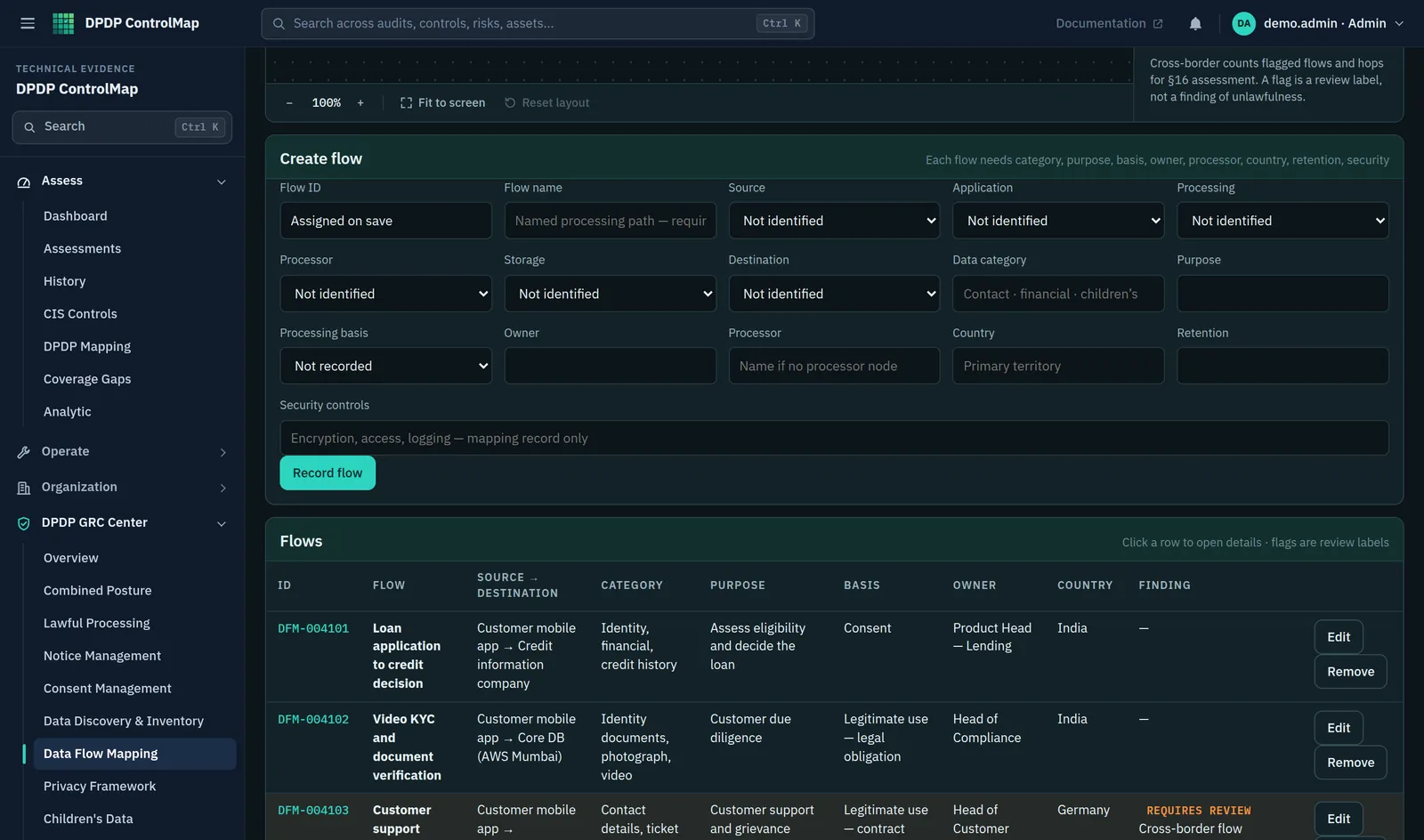
Each flow in the register records its source and destination, the data category, the purpose, the processing basis, the owner, the processor and the country. Where a detail is missing or needs attention, ControlMap raises a finding against the flow.
Findings are specific: unknown destination, unknown processor, unknown country, cross-border flow requiring review, missing owner, missing processing basis. Ten flow controls assess whether flows are identified, attributed and reviewed, and cross-border flows pass to the Cross-Border module for a transfer assessment.
Key capabilities
What you can do with it
Flow register
Source, destination, data category, purpose, basis, owner, processor and country for each flow.
Automatic findings
Six finding types raised from the record itself, with no separate review step needed to spot a gap.
Cross-border identification
A flow whose destination is outside India is marked for review.
Transfer assessments
Each overseas transfer can be assessed and given a status: allowed, restricted, requires review or exception.
Restriction watch list
A place to record Central Government restriction notifications as they are issued, and check transfers against them.
Flow controls
Ten controls covering identification, source, destination, purpose, processor, location, transfer, category, owner and review.
In the product
The flow register
The form for a flow sits above the register, with findings shown against each row.
- Source and destination with data category and purpose
- Basis, owner and country in the same row
- A finding where a flow crosses a border or lacks a detail
Typical workflow
How teams use it
A common sequence. The product does not force the order, and you can return to the earlier steps as you learn more.
Record the flow
Enter source, destination and what moves between them.
Attribute it
Add the purpose, the basis for processing and the owner.
Identify the processor and country
Name the processor, if there is one, and the country of the destination.
Resolve the findings
Work through the findings the product raises until none remain or each has an accepted explanation.
Assess overseas transfers
For each cross-border flow, record an assessment and a status.
DPDP governance
How it supports your obligations
Reviewing flows is an organisational control. These are the provisions it helps you evidence.
Personal data may be processed only for a lawful purpose, with consent or for certain legitimate uses.
The basis is recorded for each flow, and its absence is a finding.
The Data Fiduciary remains responsible for processing by its processors and may engage them only under a valid contract.
An unknown processor on a flow is raised as a finding.
The Central Government may restrict transfers to countries or territories it notifies, and transfers under the Rules are subject to requirements it specifies.
Overseas flows are identified, assessed individually and checked against the restrictions you record.
Scope
What stays with you
We would rather you knew the boundaries before a demo than discovered them after.
- ControlMap does not receive restriction notifications automatically. Your team records them from the official source.
- A transfer status is your organisation's assessment. It is not a legal determination that a transfer is permitted.
Questions
Data Flow Management: common questions
What triggers a finding on a flow?
A missing or unknown value for destination, processor, country, owner or processing basis, or a destination outside India. The finding is cleared when the detail is recorded or, for cross-border flows, when the transfer has been assessed.
Has the Central Government restricted any countries?
Section 16 gives the Central Government the power to restrict transfers by notification. Check the Ministry of Electronics and Information Technology for current notifications. ControlMap provides a watch list to record them and does not state which countries are restricted.
Does a cross-border finding mean the transfer is unlawful?
No. It means the flow leaves India and should be assessed. The outcome of that assessment is recorded as its status.
See Data Flow Management in a demo.
We will show the module with the product's sample data and answer what it does and does not cover.