Privacy Operations · Privacy Notices
Version, review and check every privacy notice.
A register of notices with their history, owners and status, and a check of each one against what Section 5 and Rule 3 ask a notice to contain.
The problem
The notice on the website is not the notice people agreed to
Notices are edited in place. When consent is later questioned, nobody can produce the text that was shown on the day, or say who approved the change.
- There is one live notice and no record of earlier versions.
- Notices are written by legal and published by marketing, with no shared review.
- The data and purposes listed do not match what the systems do.
- Consent records do not say which notice they relate to.
What it does
Privacy Notices in ControlMap
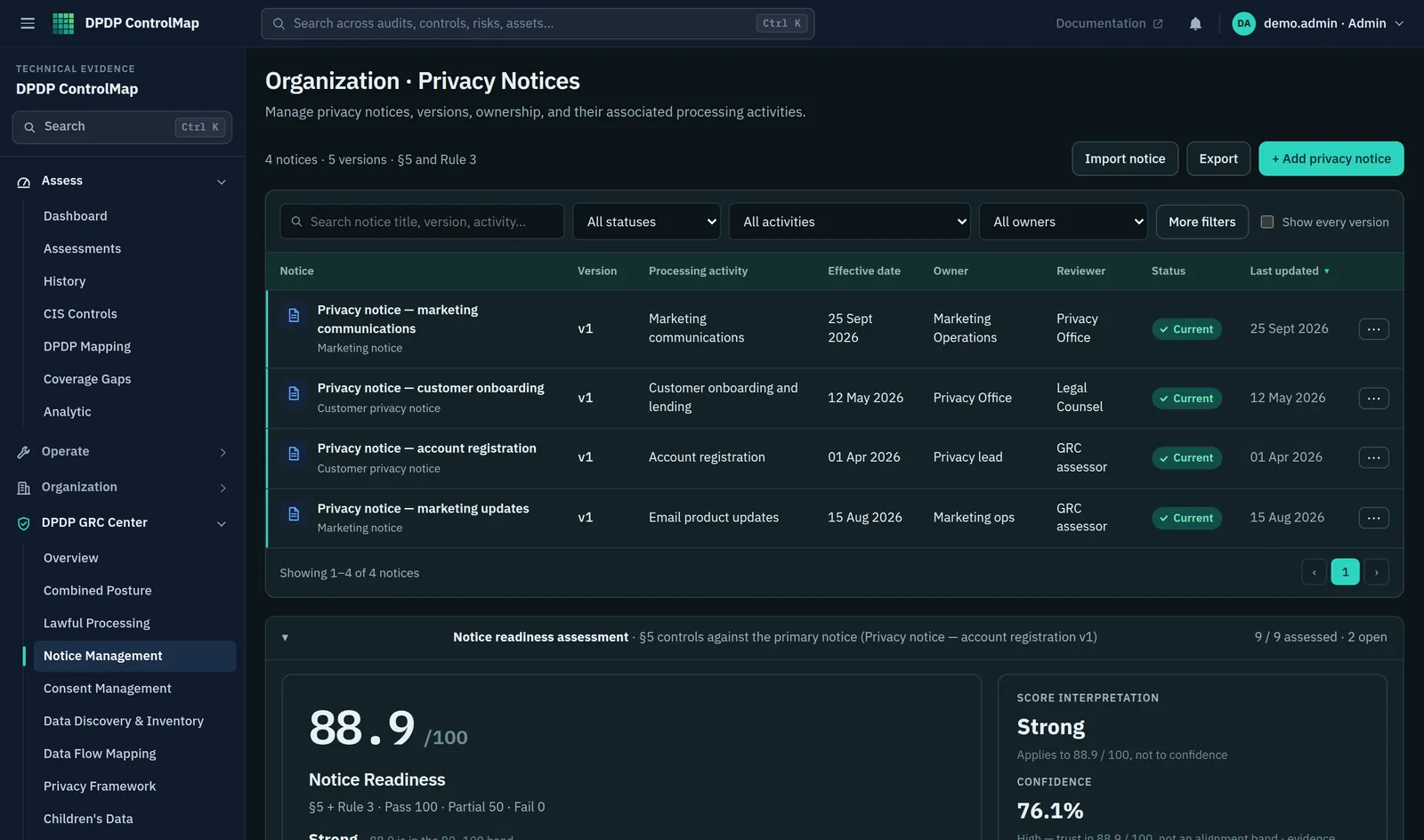
Notice Management keeps every notice as a series of versions. Each version has a status, an owner, a reviewer, the processing activity it covers, the date it takes effect and a summary of what changed. One version is current; earlier ones are superseded or archived, not overwritten.
The module also checks the text of a notice for each element the framework calls for, such as an itemised description of the personal data, the purposes, and how to withdraw consent, exercise rights and complain to the Board. Each element is marked as indicated, weak or not found, and nine controls assess the notice process as a whole.
Key capabilities
What you can do with it
Version history
Draft, under review, current, superseded and archived, with the effective date and change summary for each version.
Owner and reviewer
Two named roles on every version, so drafting and review are separate and recorded.
Linked to processing
Each notice names the processing activity it covers, and consent records refer to the notice version.
Content check
The notice text is checked element by element against Section 5 and Rule 3, with a result for each.
Notice readiness score
A score for the notice controls, with implementation and evidence shown separately.
Export
Download the notice register as CSV for a review or an audit file.
In the product
The notice register
Every notice with its version, status and the people responsible.
- Version, processing activity and effective date for each notice
- Owner and reviewer side by side
- A notice readiness score measured against Section 5 and Rule 3
Typical workflow
How teams use it
A common sequence. The product does not force the order, and you can return to the earlier steps as you learn more.
Draft
Create a version, link it to the processing activity and add the text.
Check the content
Run the check and address elements marked weak or not found.
Review
The reviewer examines the version and the check results.
Make it current
Set the effective date. The previous version becomes superseded and stays in the history.
Keep consent aligned
Consent recorded against an obsolete notice is raised as a finding in Consent Management.
DPDP governance
How it supports your obligations
Notice requirements are set out in the Act and made specific by the Rules.
A request for consent is to be accompanied or preceded by a notice informing the Data Principal of the personal data and purpose of processing, how to exercise rights under Sections 6(4) and 13, and how to complain to the Board.
The content check looks for each of these elements in the notice text.
The Data Principal is to have the option of accessing the notice in English or any language specified in the Eighth Schedule to the Constitution.
Each language version can be kept as its own record, with the same owner and review.
The notice is to be understandable independently of other information, in clear and plain language, with an itemised description of the personal data, the specified purposes and the goods, services or uses enabled, and a communication link for withdrawing consent, exercising rights and complaining to the Board.
Controls cover a standalone notice, plain language, itemisation, purpose and service description, and each mechanism.
Scope
What stays with you
We would rather you knew the boundaries before a demo than discovered them after.
- The content check looks for the presence of each element in the text. It supports a review and is not a legal opinion on the notice.
- ControlMap does not publish notices to your website or app.
- Translation into other languages is done by you.
Questions
Privacy Notices: common questions
How does the content check work?
It examines the notice text for each required element and reports whether it is indicated, weak or not found. A person should confirm every result; the check is designed to catch omissions, not to approve wording.
Can we keep notices for different products or audiences?
Yes. Each notice is its own record with its own versions, linked to the processing activity it covers.
What happens to consent when a notice changes?
Consent records keep the notice version they were given under. Where that version is no longer current, Consent Management raises an obsolete-notice finding so you can decide whether fresh consent is needed.
See Privacy Notices in a demo.
We will show the module with the product's sample data and answer what it does and does not cover.