Data Governance · Data Classification
Label personal data the same way everywhere.
A classification on every inventory record, so the datasets that need the most care, including children's data, can be found and treated consistently.
The problem
Without labels, every dataset gets the same treatment
Security and privacy controls are meant to be proportionate. That requires knowing which data is which, and most inventories do not say.
- Children's data is not marked, so the additional duties attached to it are missed.
- Encryption and access decisions are made system by system, with no reference to the data inside.
- Classification schemes exist in a policy document but not on the records.
What it does
Data Classification in ControlMap
Classification in ControlMap is an attribute of the inventory record. Each dataset is labelled personal, children's, confidential or restricted, or left as unclassified until someone decides.
The label sits beside the record's encryption status and access group, so a reviewer can see whether the protection matches the class. Unclassified records are counted on the module summary and reduce inventory coverage.
Key capabilities
What you can do with it
Five classes
Personal, children's, confidential, restricted and unclassified, applied per dataset.
Children's data marked
Datasets holding children's data are identifiable, which is the starting point for the Children's Data module.
Protection beside the label
Encryption status and access group are recorded on the same record as the classification.
Unclassified count
The number of unclassified records is shown on the summary and is one click from the filtered list.
Classification control
A catalogue control assesses whether classification is applied across the inventory, with evidence.
Filter by class
Pull every restricted or children's dataset into one view for a review.
In the product
Classification on the record
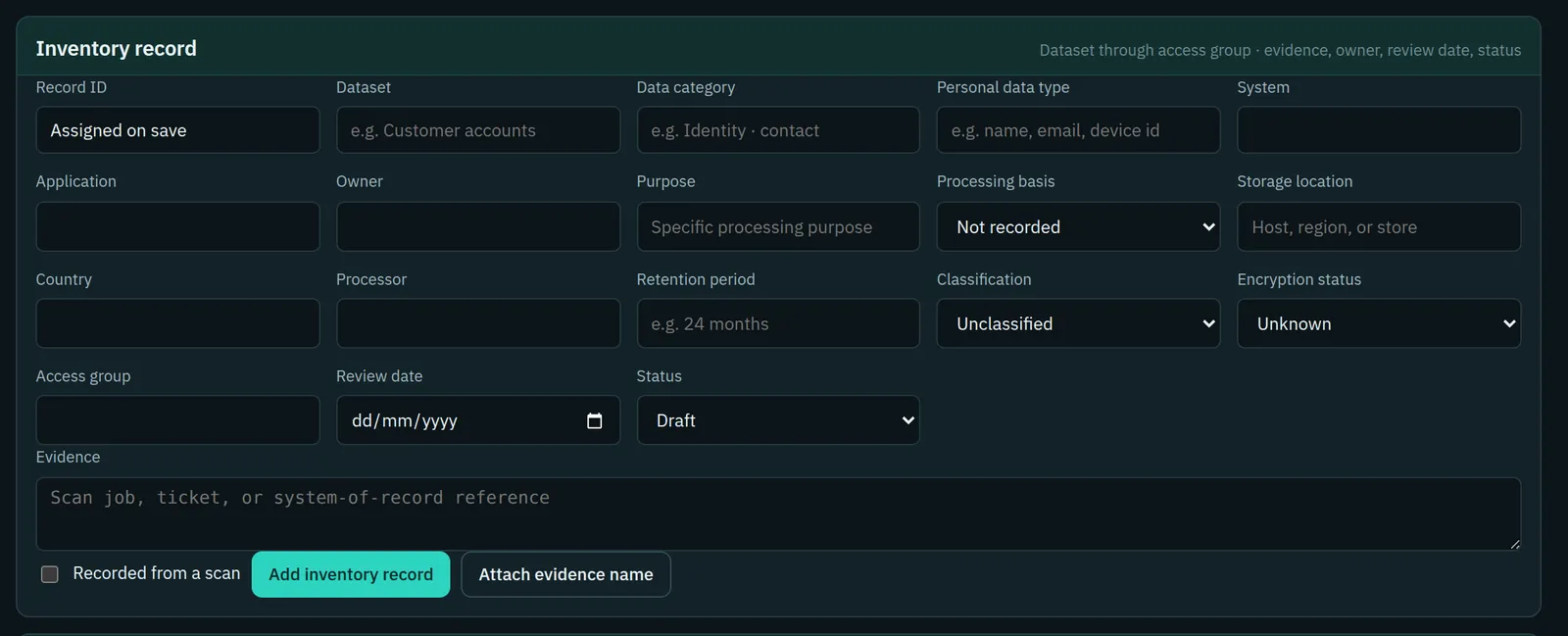
The inventory record form holds classification with the other attributes of a dataset.
- Classification chosen from a fixed list, so labels stay consistent
- Encryption status and access group on the same form
- Review date and evidence for each record
Typical workflow
How teams use it
A common sequence. The product does not force the order, and you can return to the earlier steps as you learn more.
Agree what the classes mean
Write down, in your own policy, what makes a dataset confidential or restricted in your organisation.
Classify each record
The dataset owner applies the class when the record is created or reviewed.
Check protection against class
Review encryption status and access groups for restricted and children's datasets first.
Clear the unclassified list
Treat every unclassified record as an open item until it has a label.
DPDP governance
How it supports your obligations
The Act does not set classification levels. It does treat some processing differently, and classification is how an organisation finds that processing in its own records.
Processing a child's personal data requires verifiable consent of the parent or lawful guardian, and tracking, behavioural monitoring and targeted advertising directed at children are not to be undertaken, subject to prescribed exemptions.
Datasets classified as children's data are identifiable for these additional checks.
A Data Fiduciary is to protect personal data by taking reasonable security safeguards, which under the Rules include measures such as encryption, obfuscation, masking or virtual tokens, and access control.
Classification, encryption status and access group are recorded together, so protection can be reviewed against sensitivity.
Scope
What stays with you
We would rather you knew the boundaries before a demo than discovered them after.
- Classification is applied by a person. ControlMap does not inspect data content or suggest a class.
- The class is recorded for each dataset, not for each field or column.
- The product records encryption and access status as you report them. It does not enforce either.
Questions
Data Classification: common questions
Can we use our own classification levels?
The product has a fixed list: personal, children's, confidential, restricted and unclassified. Most internal schemes map onto it. Tell us during a demo if yours does not.
Does the Act define sensitive personal data?
No. The Act applies to all digital personal data and does not define a separate sensitive category. It does set additional requirements for children's data and for Significant Data Fiduciaries.
Is classification automatic?
No. It is a decision recorded by the dataset owner or the privacy team.
See Data Classification in a demo.
We will show the module with the product's sample data and answer what it does and does not cover.